TripAdvisor Scraper: Scrape Hotel Reviews with Python (2026)
A TripAdvisor scraper fetches public hotel pages and extracts the rating, the review count, the hotel's rank in its city and the latest reviews. Hotel groups and travel analysts use this data to track guest sentiment next to price and to compare competing properties.
This 2026 guide shows how to scrape TripAdvisor reviews, ratings and rankings with Python. It compares the official TripAdvisor API with data scraping, shows two ways to fetch pages, and shares a tested script. We also publish a small live run on five hotels in Rome and New York City from 24 October 2026. The guide covers publicly available pages only, never logged-in areas.
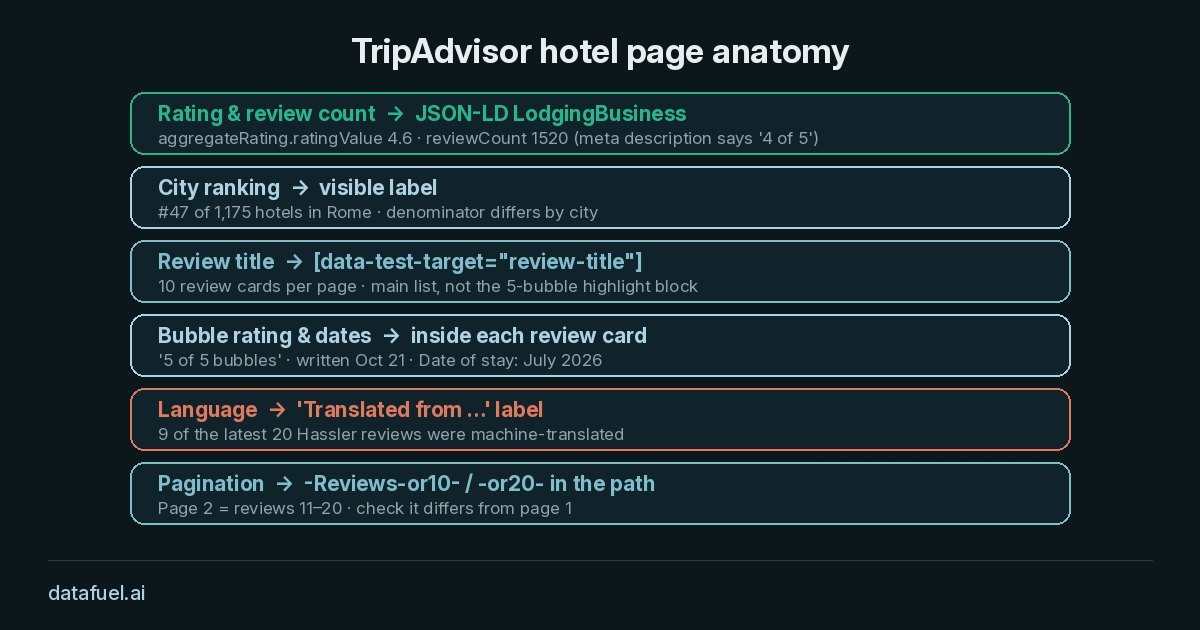
What a TripAdvisor scraper extracts from a hotel page
Every TripAdvisor URL for a hotel carries two IDs. The geo ID marks the city, such as g187791 for Rome. The location ID marks the property, such as d191332 for Hotel Hassler.
When you scrape TripAdvisor hotels, the page gives you data including:
- Name, address and coordinates from the
LodgingBusinessJSON-LD block. - Rating and review count from
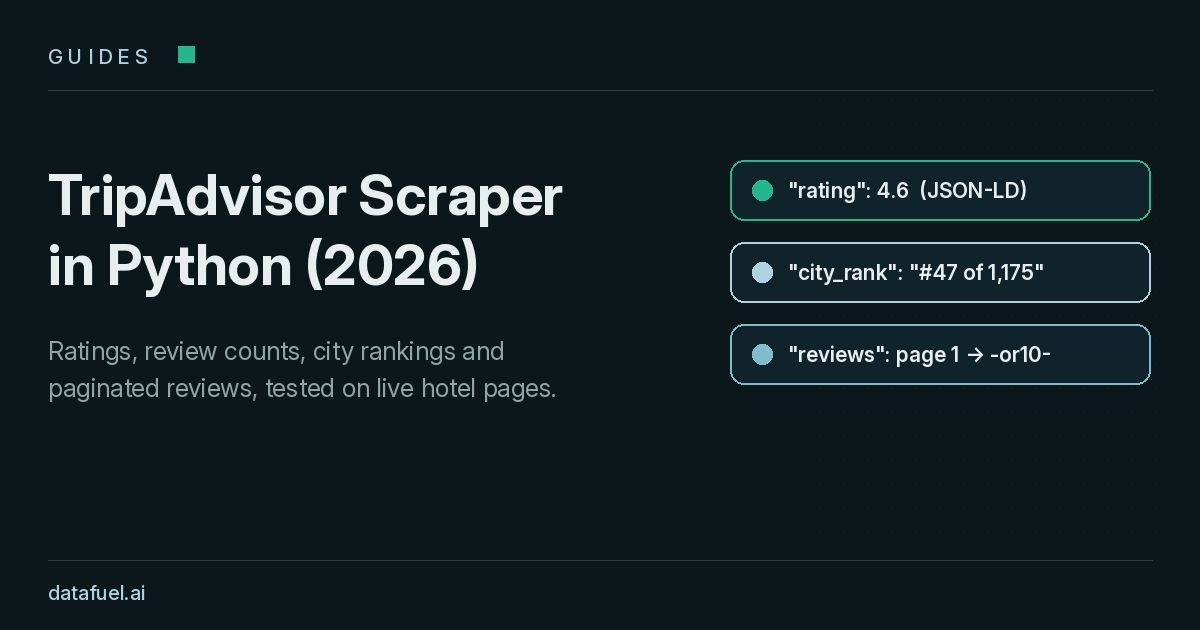
aggregateRating, for example4.6and1520. - City ranking from the visible label, such as
#47 of 1,175 hotels in Rome. - Review titles from elements with
data-test-target="review-title", ten per page. - Review rating, dates and language from each review card, such as
5 of 5 bubbles,Date of stay: July 2026andTranslated from Portuguese.
The review text sits in the same cards. Review cards also show the reviewer's name and hometown. Our script skips those fields on purpose, because they are personal data (see the FAQ).
TripAdvisor API vs a TripAdvisor reviews scraper
Check the official TripAdvisor API first. The Content API covers location search, details, photos and reviews. According to the Tripadvisor developer documentation, the reviews request returns up to 5 of the most recent reviews per location. The docs also set a per-second limit and a daily limit on API calls, which depends on your account budget.
| Need | Official TripAdvisor API | TripAdvisor scraper |
|---|---|---|
| Show reviews on your own site | Designed for this | Not the right tool |
| Rating, number of reviews, ranking | Yes | Yes, from public pages |
| More than 5 recent reviews per hotel | No | Yes, page by page |
| Competitor set across many cities | Limited by daily budget | Limited by your volume |
If you only need summary data for properties you display, start with the API. Teams build a reviews scraper when they need longer review history or rankings across a competitor set.
Why a plain Python request to scrape TripAdvisor fails
A first attempt usually pairs requests.get(url) with CSS selectors in BeautifulSoup. On TripAdvisor, that approach hits three problems.
- HTTP 403 before any HTML. All 12 of our plain requests returned
403 blocked. Hotel pages load dynamic content, and every request with JavaScript rendering returned HTTP 200. Our guide to bot detection in 2026 explains how sites score requests. - A rounded rating in the meta tag. The meta description says Hotel Hassler is "rated 4 of 5". The JSON-LD block says
4.6. Read the JSON-LD. - A positive-only highlight block. Above the review list, a box called "Why guests love this hotel" shows only recent 5-bubble reviews. Parse the main review list instead.
Two ways to build a TripAdvisor scraper in Python
You can fetch pages with your own browser setup, or with one API request per page.
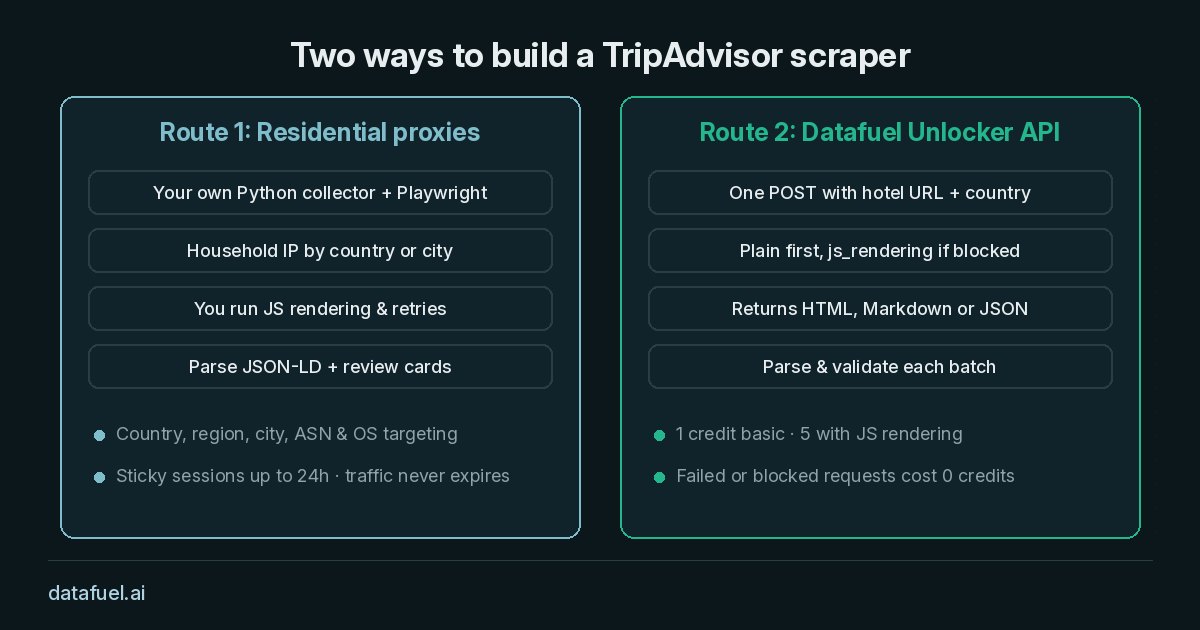
Route 1: Residential proxies with your own scraper
If you already run Python with requests or Playwright, residential proxies send each request through household IPs. Datafuel residential proxies support country, region, city, ASN and OS targeting, with sticky sessions of up to 24 hours. Datafuel bills this traffic per GB, and the traffic never expires.
City targeting matters for travel data, because travelers in Rome and New York can see different currencies and languages. Hotel pages need JavaScript rendering, so this route usually runs Playwright through the proxy:
import os

user = "-".join(["network-residential", "country-it", "city-rome", "session-48213"])
proxy_url = f"http://{user}:{os.environ['DATAFUEL_PROXY_PASSWORD']}@gw-us.datafuel.ai:5555"
The live test below used Route 2.
Route 2: Datafuel Unlocker API
The Unlocker API takes a URL and a country code and returns HTML, Markdown or JSON in one POST request. Datafuel charges 1 credit for a basic page and 5 credits for a page with JavaScript rendering. It does not bill failed requests.
So the script sends a cheap plain request first. It switches to JavaScript rendering only when the target blocks it.
TripAdvisor scraper Python code: ratings, ranking and review pages
This TripAdvisor scraper Python example reads the JSON-LD block, parses the city ranking and follows review pagination. TripAdvisor shows ten reviews per page. Page 2 adds -or10- after -Reviews in the path, and page 3 uses -or20-. Set your API key in DATAFUEL_API_KEY first.
import json, os, re, time, requests
from bs4 import BeautifulSoup

API = "https://scraping-api.datafuel.ai/api/v1/task"
HEADERS = {"X-API-Key": os.environ["DATAFUEL_API_KEY"]}

def fetch_html(url, country, retries=2):
    for js in (False, True):  # plain first, JS rendering if blocked
        for attempt in range(retries):
            attrs = {"url": url, "result_format": "html", **({"js_rendering": True} if js else {})}
            body = {"type": "unlocker", "proxy_type": "Basic", "proxy_country": country, "attributes": attrs}
            try:
                task = requests.post(API, headers=HEADERS, json=body, timeout=(10, 120)).json()
            except (requests.RequestException, ValueError):
                time.sleep(2 ** attempt + 1)
                continue
            code = task.get("status_code")
            if task.get("status") == "completed" and code == 200:
                return task["result"]["data"]
            if code in (404, 410):
                return None
            if task.get("blocked") or code == 403:
                break  # switch to JS rendering
            time.sleep(2 ** attempt + 1)
    return None

def page_url(url, page):
    return url if page == 1 else url.replace("-Reviews-", f"-Reviews-or{(page - 1) * 10}-", 1)

def parse_hotel(html):
    soup = BeautifulSoup(html, "html.parser")
    hotel = None
    for tag in soup.select('script[type="application/ld+json"]'):
        try:
            data = json.loads(tag.string or "")
        except ValueError:
            continue
        for node in data.get("@graph", [data]) if isinstance(data, dict) else data:
            if isinstance(node, dict) and node.get("@type") in ("Hotel", "LodgingBusiness"):
                hotel = node
    if hotel is None:
        raise ValueError("No LodgingBusiness JSON-LD: block page or layout change")
    agg = hotel.get("aggregateRating", {})
    rank = re.search(r"#([\d,]+) of ([\d,]+) hotels in ([^|]+?) \|", soup.get_text(" | ", strip=True))
    reviews = []
    for title in soup.select('[data-test-target="review-title"]'):
        card = title
        while card.parent and len(card.parent.select('[data-test-target="review-title"]')) == 1:
            card = card.parent
        text = card.get_text(" | ", strip=True)
        bubbles = re.search(r"(\d) of 5 bubbles", text)
        lang = re.search(r"Translated from ([A-Z][a-z]+)", text)
        reviews.append({"title": title.get_text(" ", strip=True),
                        "rating": int(bubbles.group(1)) if bubbles else None,
                        "translated_from": lang.group(1) if lang else None})
    return {"name": hotel.get("name"), "rating": float(agg.get("ratingValue", 0)) or None,
            "review_count": agg.get("reviewCount"),
            "city_rank": int(rank.group(1).replace(",", "")) if rank else None,
            "reviews": reviews}

url = "https://www.tripadvisor.com/Hotel_Review-g187791-d191332-Reviews-Hotel_Hassler-Rome_Lazio.html"
row = {"url": url, "reviews": []}
for page in (1, 2):
    html = fetch_html(page_url(url, page), "IT")
    if html:
        parsed = parse_hotel(html)
        row.update({k: v for k, v in parsed.items() if k != "reviews"})
        row["reviews"] += parsed["reviews"]
print(row["name"], row["rating"], row["review_count"], row["city_rank"], len(row["reviews"]))
Loop over your own hotel list to scrape TripAdvisor data at scale, then export each row to CSV or a database. Reviewer names never enter the output.
Live test: 5 hotels in Rome and New York City on 24 October 2026
Method. We ran the script on 24 October 2026 at 08:47 UTC against five public hotel pages on tripadvisor.com. Rome used proxy_country="IT" and New York City used "US". Settings: proxy_type: Basic, result_format: html, plain request first, js_rendering: true after a block, and two review pages per hotel.
| Hotel | City | Rating | Reviews | City Rank | Avg. of Latest 20 | Translated | Credits |
|---|---|---|---|---|---|---|---|
| Hotel Hassler | Rome | 4.6 | 1,520 | #47 of 1,175 | 5.0 | 9 of 20 | 10 |
| Hotel Artemide | Rome | 4.8 | 9,593 | #14 of 1,175 | 4.7 | 1 of 20 | 10 |
| Albergo del Senato | Rome | 4.8 | 5,154 | #18 of 1,175 | 4.95 | 0 of 20 | 10 |
| The Langham, New York, Fifth Avenue | New York City | 4.7 | 3,436 | #87 of 530 | 4.65 | 0 of 20 | 10 |
| YOTEL New York Times Square | New York City | 4.1 | 15,432 | #444 of 530 | 1.85 | 3 of 20 | 10 |
What we found:
- Rendering decided success. All 10 plain attempts returned
403 blockedat 0 credits. All 10 rendered pages returned HTTP 200 in 4.85 to 8.36 seconds, for 50 credits. - Pagination worked. Page 2 returned ten new reviews on every hotel. One generic title repeated across pages, so de-duplicate on review text, not on the title.
- The lifetime rating hides recent trends. YOTEL New York Times Square shows 4.1 overall, but its latest 20 reviews average 1.85 bubbles.
- Ranking is not the rating. The Langham has a 4.7 rating but ranks #87 of 530. Store rank and city total as separate fields.
- Translated reviews are common. At Hotel Hassler, 9 of the latest 20 reviews were machine-translated.
- Markdown is 22 times smaller. A Markdown request returned 48 KB instead of 1.05 MB of HTML, with rating, review count and rank still visible. It drops the JSON-LD, so use HTML for parsing.
- Default order is not strictly newest first. On two hotels, page 1 mixed a January review with October reviews. Sort by date before you call titles "latest".
The full study used 75 credits. That total includes two city list pages, the hotel search results we used to pick URLs. It also covers one test page, a Markdown check and a final run of the snippet above.
Silent-failure checks for a TripAdvisor review scraper
A scheduled TripAdvisor review scraper rarely crashes. When the layout changes, it quietly writes empty ratings or repeats page 1.
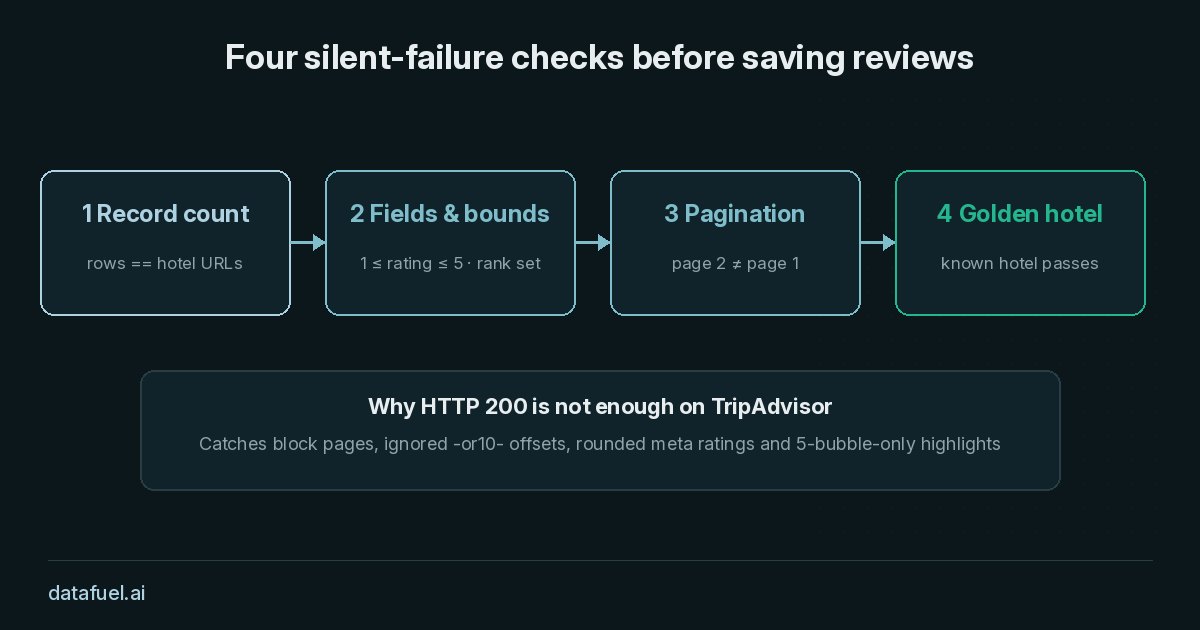
Run four checks before each batch reaches storage:
- Record count: one row per requested hotel URL.
- Fields and bounds: name, rating, review count and city rank present, and the rating between 1 and 5.
- Pagination changed the page: titles on page 2 must differ from page 1.
- Golden hotel: keep one known hotel in every run, and quarantine the batch if it fails.
def validate_batch(rows, expected_count, golden_ids=()):
    errors = [] if len(rows) >= expected_count else [f"Count mismatch: {len(rows)}/{expected_count}"]
    for r in rows:
        errors += [f"Missing {k} on {r['url']}" for k in ("name", "rating", "review_count", "city_rank") if r.get(k) in (None, "")]
        if r.get("rating") and not 1.0 <= r["rating"] <= 5.0:
            errors.append(f"Rating out of range on {r['name']}")
        titles = [x["title"] for x in r.get("reviews", [])]
        if len(titles) < 10 or set(titles[:10]) == set(titles[10:20]):
            errors.append(f"Too few reviews or repeated page on {r.get('name')}")
    errors += [f"Golden hotel {g} failed" for g in golden_ids if not any(g in r["url"] and r.get("rating") for r in rows)]
    return errors
On our five-hotel run, with Hotel Hassler (d191332) as the golden hotel, validate_batch returned no errors.
Price plus reputation for scraping hotels
Reviews help explain why a hotel can charge more or has to discount. Pair your ratings and rankings with nightly rates by market. Our hotel price API by country test shows how the same room changes price by shopper location. Side by side, the two datasets show whether a property kept its rate while its recent rating fell.
Frequently asked questions
Should I use the TripAdvisor API or a TripAdvisor scraper?
Use the official API when you display TripAdvisor content in your own app and its limits fit your needs. Its reviews request returns up to 5 recent reviews per location. Teams scrape publicly available pages when they need full details such as longer review history or rankings across many cities. Some teams use both.
How often should a TripAdvisor scraper refresh hotel data?
For most dashboards, a daily or weekly run is enough. Ratings and rankings move slowly. Collect page 1 of reviews daily for your own and competing hotels, and refresh deeper pages weekly.
How do I handle reviews in different languages?
TripAdvisor shows many reviews machine-translated and labels them "Translated from ...". Store that flag with each review. For sentiment scoring, keep the source language, or request the local domain such as tripadvisor.it from an Italian exit.
Is it legal to scrape TripAdvisor?
It depends on your jurisdiction, how you collect the data and how you use it. TripAdvisor's terms of use restrict automated collection and reuse of its content. Reviews also contain personal data, such as names and hometowns, which privacy laws like the GDPR cover.
A common baseline is to collect only public pages without logging in, skip reviewer identities, keep request rates moderate and avoid republishing review text. This guide is not legal advice, so review your use case with qualified legal counsel.
Try the TripAdvisor scraper on your own hotel list
Every Datafuel account starts with 1,000 free credits, valid for one year, with no credit card required. At 5 credits per rendered page, that covers about 200 hotel pages. See the pricing page for volume rates, then run the script on the hotels you track.