How to Monitor Competitors with Python and AI (2026)
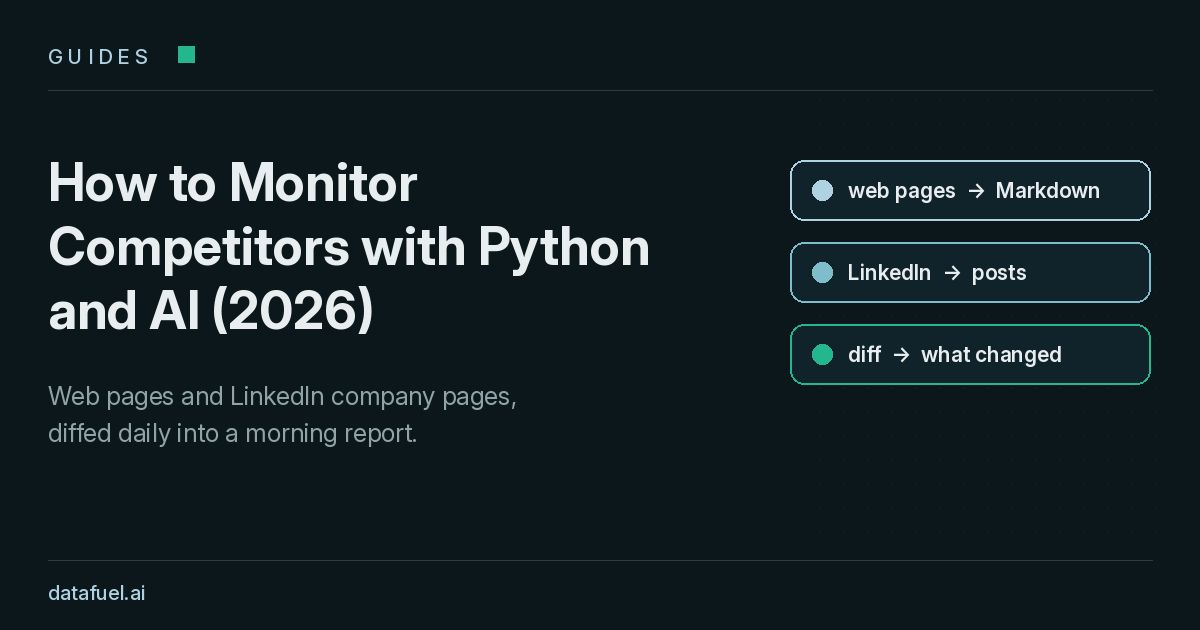
Short answer: to monitor competitors with Python, re-fetch the pages that matter every morning, including their websites and public LinkedIn company pages, and compare each one with yesterday's snapshot. Then send only the deltas to an LLM that writes an AI summary of competitor activity.
This 2026 guide documents the competitive intelligence pipeline we run at Datafuel on about 560 pages a day, with tested code and a scheduling recipe for Grok Bot, Claude or any other model.
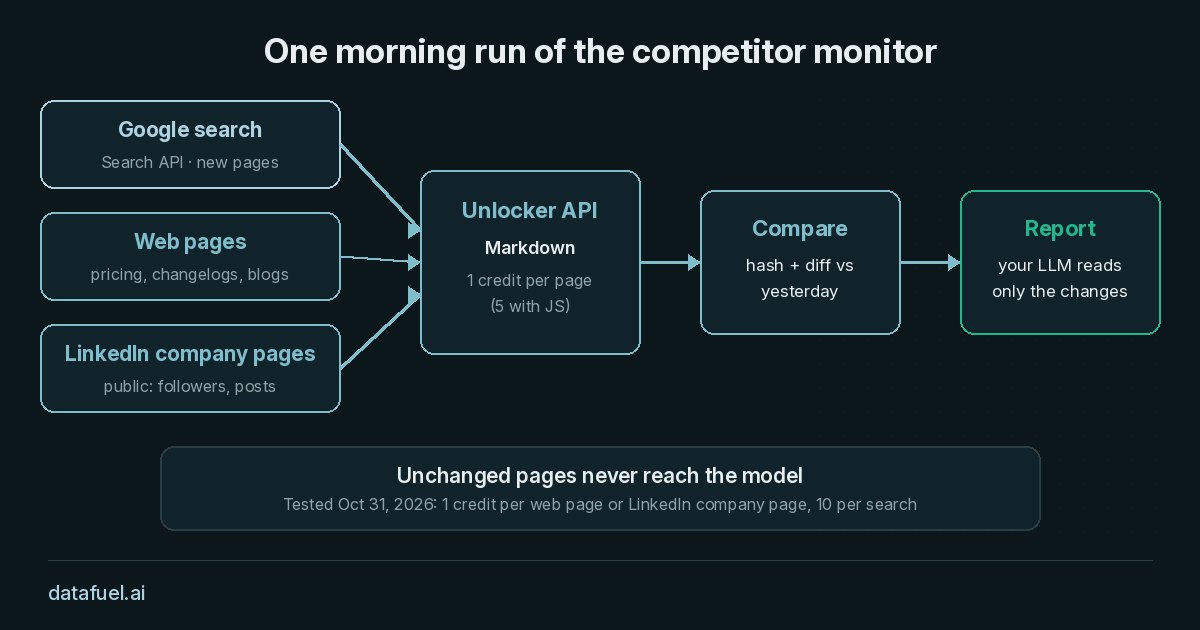
What a competitor monitoring AI agent does each morning
The agent reports what changed since yesterday and why it might matter, in four stages:
- Search. Google queries surface pages you don't have a URL for yet.
- Read. The agent re-fetches a fixed watchlist: pricing, release notes, blogs, docs and public LinkedIn company pages.
- Compare. The agent stores each page as a snapshot, and a hash plus a line diff isolate what changed.
- Report. The LLM receives only the diffs and new search results.
Who uses competitor tracking
Competitor tracking is the daily layer of competitive intelligence. Teams track competitors to pay attention to what changed, rather than rereading everything competitors publish online.
- Marketing teams follow messaging, market positioning and product launches, and adjust their marketing strategies.
- Sales teams need current competitors' pricing and new features before a call.
- Founders and product managers compare multiple competitors side by side.
How this compares to a competitor monitoring tool
A packaged competitor monitoring tool covers more channels. This script covers fewer, but gives you full control over sources, prompts and stored data. Side by side:
- Google Alerts emails you when new pages match a keyword, which helps you find mentions of competitors online. Google Alerts doesn't diff a known pricing page or changelog.
- SEO tools measure competitors' performance in search, including rankings, share of voice and competitors' backlinks. This script doesn't track backlinks or rankings, so pair it with SEO tools for that.
- Social listening suites follow mentions of a competitor's brand across social media, often in real time, and report engagement rates. Our LinkedIn snapshots store follower counts and post text, not reactions or comments, so the script doesn't measure engagement rates.
- This script re-reads the exact pages you choose, including competitors' pricing pages and changelogs, and produces a daily AI summary of what changed. It doesn't run in real time.
Many teams pair competitor analysis tools for search and social with this script for the pages that define a competitor's market positioning.
Why the agent reads pages through an API
An AI agent pays for every token in its context window. On October 31, 2026 we read 10 public pages two ways: a direct fetch, and the Unlocker API returning Markdown with main content only. We counted tokens with tiktoken (o200k_base). On the 7 pages both methods could read, raw HTML came to 1,401,337 tokens and converted text to 92,230. Unlocker API Markdown came to 45,379 tokens: 97% fewer than HTML and 51% fewer than text.
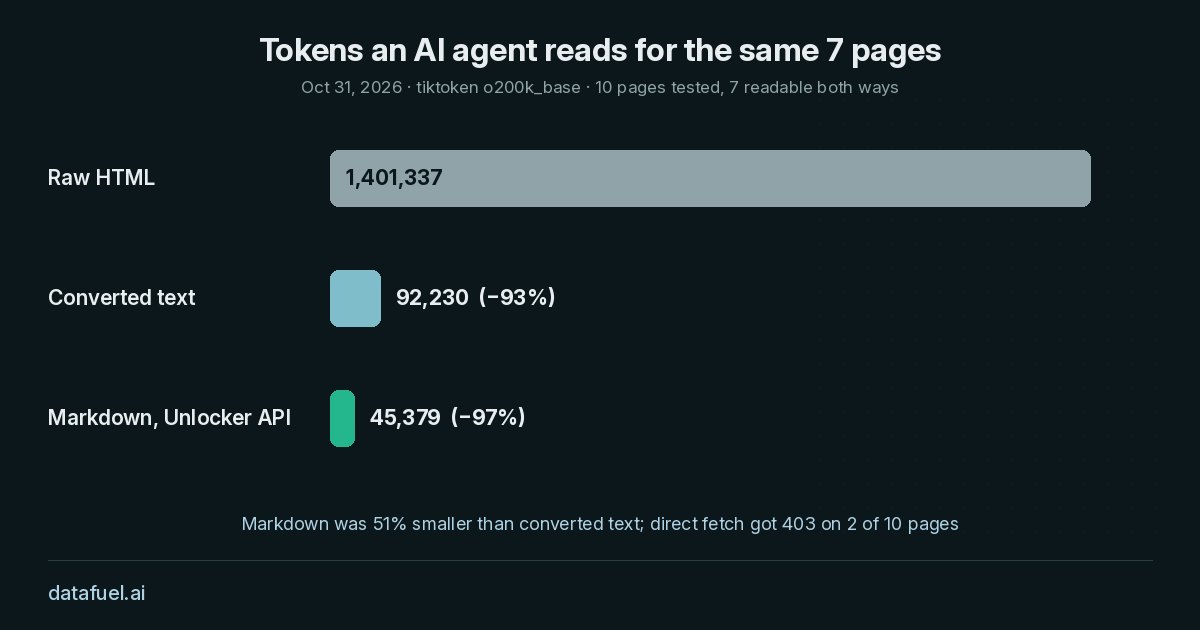
The direct fetch received an HTTP 403 on 2 of the 10 pages, which the API returned in full. Direct requests still had lower latency (0.1 to 2.8 seconds against 2.3 to 5), and on one docs page Markdown was 5% larger than text.
Competitor monitoring Python setup
The competitor monitoring Python script below needs Python 3.10 or later, requests and a Datafuel API key in the DATAFUEL_API_KEY environment variable. The 1,000 free trial credits cover every test; never hard-code the key.
import datetime as dt
import difflib
import hashlib
import json
import os
import pathlib
import re
import time

import requests

API = "https://scraping-api.datafuel.ai/api/v1"
HEADERS = {"X-API-Key": os.environ["DATAFUEL_API_KEY"]}
SNAPSHOTS = pathlib.Path("snapshots")

# Pages you re-read every day: pricing, changelogs, blogs, docs and public
# LinkedIn company pages (kind "linkedin"). Public pages only, no login.
WATCH = [
    {"name": "Python downloads", "url": "https://www.python.org/downloads/"},
    {"name": "requests releases", "url": "https://github.com/psf/requests/releases"},
    {"name": "Cloudflare blog", "url": "https://blog.cloudflare.com/"},
    {"name": "MDN blog", "url": "https://developer.mozilla.org/en-US/blog/"},
    {"name": "Microsoft on LinkedIn", "url": "https://www.linkedin.com/company/microsoft/", "kind": "linkedin"},
    {"name": "Google on LinkedIn", "url": "https://www.linkedin.com/company/google/", "kind": "linkedin"},
]

# Google searches for things you don't know the URL of yet (past 7 days).
SEARCHES = [
    {"query": "web scraping API pricing change", "tbs": "qdr:w"},
]
call() sends one task, waits when the API answers 202, and backs off on 429 or 503:
def call(body, tries=4):
    """POST /task with polling and retries. Returns the task JSON."""
    for attempt in range(tries):
        r = requests.post(f"{API}/task", headers=HEADERS, json=body, timeout=(10, 180))
        if r.status_code in (429, 503):
            time.sleep(int(r.headers.get("Retry-After", 2)) * (attempt + 1))
            continue
        r.raise_for_status()
        task = r.json()
        while r.status_code == 202 or task.get("status") in ("queued", "running"):
            time.sleep(2)
            r = requests.get(f"{API}/task/{task['id']}", headers=HEADERS, timeout=30)
            task = r.json()
        return task
    raise RuntimeError("Datafuel API busy, try again later")
Step 1: search Google for new pages
The Search API returns Google results as JSON for 10 credits per search. tbs: "qdr:w" restricts results to the past week. When an organic result carries a google.com/goto link instead of a URL, resolve() reads the redirect header or keeps the title and source.
def resolve(link):
    """Some organic results carry a google.com/goto link instead of a URL.
    Read the redirect target without opening the page; None if there is no plain redirect."""
    if not link or "google.com/goto" not in link:
        return link
    r = requests.get(link, allow_redirects=False, timeout=15, headers={"User-Agent": "Mozilla/5.0"})
    return r.headers.get("Location") if r.status_code in (301, 302, 303) else None


def search(query, tbs=None):
    attrs = {"query": query, "country": "us", "language": "en", "page": 1, "result_format": "json"}
    if tbs:
        attrs["tbs"] = tbs
    task = call({"type": "serp", "attributes": attrs})
    rows = ((task.get("result") or {}).get("data") or {}).get("organic") or []
    hits = [{"title": r.get("title"), "url": r.get("url") or resolve(r.get("redirect")),
             "source": r.get("source"), "snippet": r.get("snippet"), "date": r.get("date")} for r in rows]
    return hits, task.get("credits_used", 0)
Step 2: read web pages and LinkedIn company pages
One Unlocker API call returns a page as Markdown. main_content_only drops navigation and footers, and include_images: false keeps the text short. JavaScript rendering costs 5 credits instead of 1, so the agent turns it on only when the first read came back empty.
def read(url):
    """Markdown of the main content. Retries with JS rendering only if the page came back empty."""
    attrs = {"url": url, "result_format": "markdown", "main_content_only": True, "include_images": False}
    task = call({"type": "unlocker", "proxy_type": "Basic", "attributes": attrs})
    md = (task.get("result") or {}).get("data") or ""
    credits = task.get("credits_used", 0)
    if task.get("status") == "failed" or len(md) < 500:
        task = call({"type": "unlocker", "proxy_type": "Basic",
                     "attributes": {**attrs, "js_rendering": True}})
        md = (task.get("result") or {}).get("data") or md
        credits += task.get("credits_used", 0)
    return md, credits
A public LinkedIn company page comes back the same way, with far more than you need for each tracked competitor. linkedin_snapshot() keeps two fields: the follower count and the company's own recent posts. It drops reposts, employee lists and links to people's profiles, so no personal data lands in your snapshots.
def linkedin_snapshot(md):
    """Keep only the company's follower count and its own recent posts.
    Reposts, employee lists and people's profiles are dropped."""
    followers = re.search(r"([\d,.]+[KM]?) followers", md)
    section = md.split("## Updates", 1)[-1].split("\n## ", 1)[0] if "## Updates" in md else ""
    posts = []
    for item in re.split(r"\n- (?=\S)", section):
        if "reposted this" in item or "/in/" in item.split("Report this post")[0]:
            continue
        link = re.search(r"\]\((https://www\.linkedin\.com/posts/[^)?]+)", item)
        text = item.split("Report this post", 1)[-1]
        text = re.sub(r"\[([^\]]*)\]\([^)]*\)", r"\1", text)          # links -> plain text
        text = re.sub(r"\s+", " ", text.split(" Reactions")[0]).strip()[:280]
        if link and text:
            posts.append(f"- {link.group(1)} | {text}")
    lines = [f"followers: {followers.group(1) if followers else 'unknown'}", "", "posts:"] + posts
    return "\n".join(lines)
Step 3: compare snapshots with a hash and a diff
A Python script that monitors competitor websites without a headless browser needs a stable copy of each page and an inexpensive comparison. normalize() removes noise that changes on every load, such as tracking parameters and "5 minutes ago" timestamps. A SHA-256 hash says whether anything changed, and difflib returns only the changed lines. A change in competitor prices shows up as one changed line, and on a LinkedIn snapshot the diff shows the new follower count plus one line per new post.
def normalize(md):
    """Drop the noise that changes on every load so the diff shows real edits."""
    md = re.sub(r"\?[^)\s]*utm_[^)\s]*", "", md)           # tracking params in links
    md = re.sub(r"\b\d+ (minutes?|hours?) ago\b", "", md)    # relative timestamps
    lines = [ln.rstrip() for ln in md.splitlines()]
    return "\n".join(ln for ln in lines if ln.strip())


def slug(name):
    return re.sub(r"[^a-z0-9]+", "-", name.lower()).strip("-")


def previous_snapshot(name, today):
    days = sorted(p.name for p in SNAPSHOTS.glob("*") if p.is_dir() and p.name < today)
    for day in reversed(days):
        f = SNAPSHOTS / day / f"{slug(name)}.md"
        if f.exists():
            return f.read_text()
    return None


def diff(old, new, max_lines=60):
    lines = difflib.unified_diff(old.splitlines(), new.splitlines(), "yesterday", "today", n=1, lineterm="")
    changed = [ln for ln in lines if ln.startswith(("+", "-")) and not ln.startswith(("+++", "---"))]
    return "\n".join(changed[:max_lines])
Step 4: one prompt for any LLM
The prompt asks for what changed, why it matters for your market positioning, and the source link. summarize() takes any function that turns a prompt into text, so no model key lives in this script.
def build_prompt(changes, hits):
    parts = ["You write a short morning report on the market we watch.",
             "Use only the changes and search results below. For each item say what changed,",
             "why it might matter, and link the source. Skip cosmetic edits and follower changes",
             "under 1%. Say 'no relevant changes' if so.", ""]
    for c in changes:
        parts += [f"## {c['name']} ({c['url']})", c["diff"], ""]
    if hits:
        parts.append("## New search results")
        parts += [f"- {h['title']} ({h.get('source') or ''}) | {h['url'] or 'no direct link'} | {h.get('date') or ''}"
                  for h in hits]
    return "\n".join(parts)


def summarize(prompt, llm=None):
    """Plug in any model: llm is a function that takes a prompt string and returns text."""
    if llm is None:
        return "(no LLM configured: prompt saved to prompt.txt)"
    return llm(prompt)
The run ties it together and saves a run.json with the credits used:
def run(today=None, llm=None):
    today = today or dt.date.today().isoformat()
    folder = SNAPSHOTS / today
    folder.mkdir(parents=True, exist_ok=True)
    credits, changes, log = 0, [], []
    for page in WATCH:
        md, c = read(page["url"])
        credits += c
        text = linkedin_snapshot(md) if page.get("kind") == "linkedin" else normalize(md)
        (folder / f"{slug(page['name'])}.md").write_text(text)
        old = previous_snapshot(page["name"], today)
        same = old is not None and hashlib.sha256(old.encode()).hexdigest() == hashlib.sha256(text.encode()).hexdigest()
        log.append({"name": page["name"], "chars": len(text), "credits": c,
                    "status": "new" if old is None else ("unchanged" if same else "changed")})
        if old is not None and not same:
            changes.append({**page, "diff": diff(old, text)})
    hits = []
    for s in SEARCHES:
        h, c = search(s["query"], s.get("tbs"))
        credits += c
        hits += h
    prompt = build_prompt(changes, hits)
    (folder / "prompt.txt").write_text(prompt)
    report = summarize(prompt, llm)
    json.dump({"date": today, "credits": credits, "pages": log, "search_hits": hits},
              open(folder / "run.json", "w"), indent=1)
    return report, credits, log
How to monitor competitors on LinkedIn
LinkedIn is the social media channel where many B2B companies announce launches, hires and partnerships, sometimes before their website changes. Our daily run therefore reads their public company pages too, which cost 22 credits on October 31, 2026.
- Public company pages only. The script reads
linkedin.com/company/<name>/without logging in, and follows competitors' brands only through those pages: no personal profiles, no logged-in scraping, no messages. - Keep only what you need. The script keeps the follower count and the company's own posts, and drops everything else before it saves the snapshot.
- Respect the rules. Check LinkedIn's terms of service and your GDPR obligations before you start, and keep the request rate low.
We tested it on the public Microsoft and Google company pages: 1 credit and about 2 seconds per read, parsing followers and recent posts from both. Follower counts moved by a few units within a minute, so the prompt skips changes under 1%, and the parser keeps only posts that carry a permalink.
Our test run and daily cost
On October 31, 2026 we ran the script on four neutral public pages plus one search, then on the two LinkedIn pages, at 1 credit per page and 10 per search. The four web pages came to 28,836 tokens of Markdown, yet on a quiet day the prompt was 345 tokens, because the model's input scales with the news rather than with the watchlist.
Our own run that day used 887 credits for about 560 pages, LinkedIn pages and two searches. At the Growth plan list price of $0.079 per 1,000 basic pages, that's about 7 cents, with model tokens on top. The pricing page lists every plan.
Build the setup in your agent
The script runs under any scheduler; three common options follow.
In Grok Bot
We run ours this way, and you configure each part by asking the agent in chat:
- Store the key. Ask the agent to save
DATAFUEL_API_KEYas a secret, so it never appears in chat or in code. - Give it the list. Share a spreadsheet with one row per page of each tracked competitor: name, URL and kind (
pageorlinkedin), plus a second tab with your Google searches. - Save a routine. Ask the agent to create a routine that runs every morning at 8:00 with a saved prompt.
- Choose where the report goes. Ask it to reply in chat and post to a Slack channel that your marketing teams and sales teams read, through the Slack connector.
An example of the saved prompt:
Every day at 8:00, run the competitor monitor:
1. Read the competitor sheet. For each row, read the URL with the Datafuel
   Unlocker API as Markdown, using the DATAFUEL_API_KEY secret. For LinkedIn
   rows keep only the follower count and the company's own posts.
2. Run the searches in the Searches tab for the past week.
3. Compare every page with yesterday's snapshot and keep only what changed.
4. Write a short report: what changed, why it might matter, source link.
   Skip cosmetic edits and follower changes under 1%.
5. Post the report here and in #competitors on Slack. If nothing changed,
   state that in a single sentence.
Optionally, ask the agent to save the steps as a skill.
In Claude
Datafuel has an MCP server at https://scraping-api.datafuel.ai/mcp. Its scrape and search tools mirror the API and bill the same. npx -y @datafuel/mcp init sets it up in Claude Code, Claude Desktop and other MCP clients. To add it to Claude Code by hand, put this .mcp.json in your project folder. Claude Code reads the key from your environment:
{
  "mcpServers": {
    "datafuel": {
      "type": "http",
      "url": "https://scraping-api.datafuel.ai/mcp",
      "headers": { "X-API-Key": "${DATAFUEL_API_KEY}" }
    }
  }
}
Save the prompt above in prompt.md without the Slack line, then schedule a headless claude -p run with cron; --allowedTools pre-approves the Datafuel tools:
# crontab -e: every day at 8:00 (the machine must be on)
0 8 * * * cd $HOME/competitor-monitor && . ./.env && claude -p "$(cat prompt.md)" --allowedTools "mcp__datafuel__scrape,mcp__datafuel__search,Read,Write" >> reports.log 2>&1
.env exports DATAFUEL_API_KEY, and claude mcp list confirms that the server is connected.
With any model
Keep the Python script and plug in any model with an OpenAI-compatible API. The model name and keys come from environment variables:
"""Run the monitor with any OpenAI-compatible model. Keys come from the environment."""
import os

from openai import OpenAI

import market_monitor

MODEL = os.environ["LLM_MODEL"]                       # the model name your provider uses
client = OpenAI(base_url=os.environ.get("LLM_BASE_URL"),  # leave unset for OpenAI itself
                api_key=os.environ["LLM_API_KEY"])


def llm(prompt):
    r = client.chat.completions.create(model=MODEL, messages=[{"role": "user", "content": prompt}])
    return r.choices[0].message.content


if __name__ == "__main__":
    report, credits, log = market_monitor.run(llm=llm)
    print(report)
    print("credits used:", credits)
Then schedule it with cron:
0 8 * * * cd $HOME/competitor-monitor && . ./.env && python3 daily.py >> reports.log 2>&1
Frequently asked questions
How many pages can one agent watch?
We watch about 560 pages a day across multiple competitors with one agent; the limit is your credits and concurrency, not the code.
How often should I check competitors?
Once a day is enough for pricing pages, changelogs, blogs and LinkedIn. Check launch pages more often only in the week of known product launches; if you need alerts in real time, use a dedicated alerting service.
Can I monitor competitors on LinkedIn without logging in?
Yes, for public company pages: the script reads the page anyone can see without an account and keeps only the follower count and company posts. It isn't social listening, so it won't catch mentions elsewhere. Don't read personal profiles, and check LinkedIn's terms and GDPR for your case.
What if a page blocks the request?
The Unlocker API handles anti-bot checks, and if a read comes back empty, the script retries with JavaScript rendering. Datafuel doesn't charge failed requests.
What is the simplest competitor monitoring tool to maintain?
For most teams it's a single Python file like the one in this guide, built on requests and difflib, with snapshots stored as plain Markdown in dated folders. This competitor monitoring Python approach stays auditable, because every run saves its snapshots and the exact prompt sent to the model.
Is it legal to monitor competitors' websites?
Reading public pages is common practice, but rules depend on your country and use case. Respect each site's terms, skip personal data and don't overload servers. This guide isn't legal advice.
Copy the setup this week
Create a free account, set DATAFUEL_API_KEY, list 20 pages and three LinkedIn company pages, and run the script tomorrow morning. The following morning's run produces your first diff.