Price Scraping with Python: Track Competitor Prices (2026)
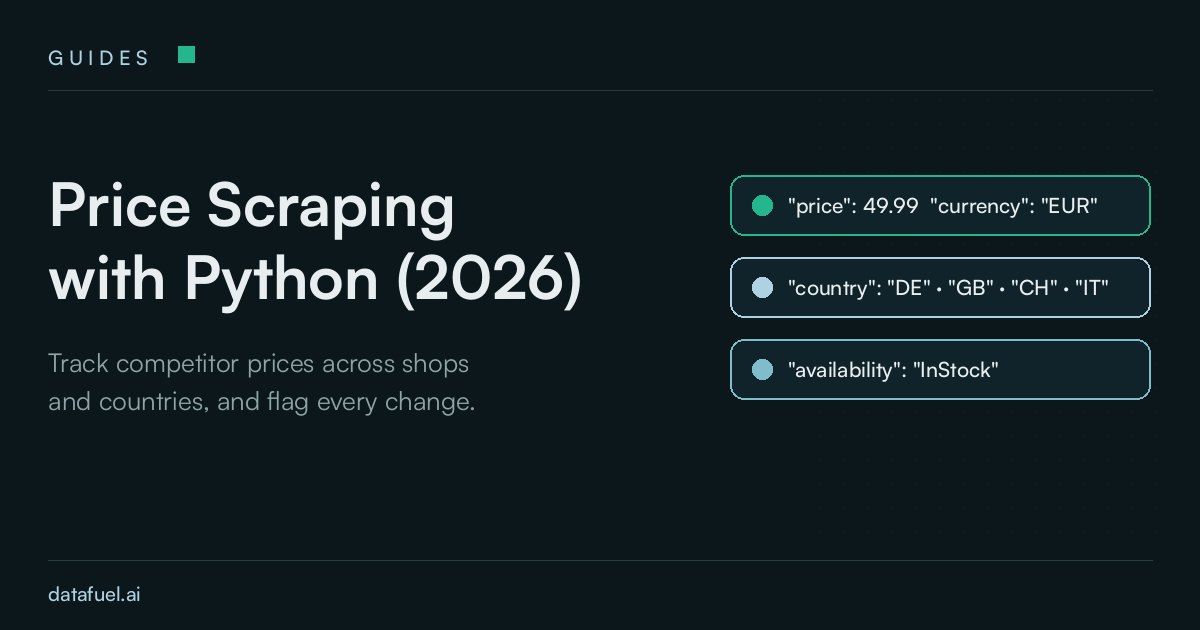
Price scraping is the automated collection of public product prices from web pages: in Python, you request each product page, read the price from the schema.org Product data embedded in the HTML, and append price, currency, title and availability to a timestamped CSV file. Comparing two CSV files then reveals every price update.
This 2026 guide builds a competitor price monitoring script for three shops and six countries and tests it live on 15 November 2026: six product pages, six valid rows and six credits per run. Black Friday falls on 27 November 2026, so a price history that starts today gives you twelve days of baseline to stay competitive and to check every discount claim against recorded data. The script reads public web pages only, and each shop's robots.txt and terms of use still apply to your use case.
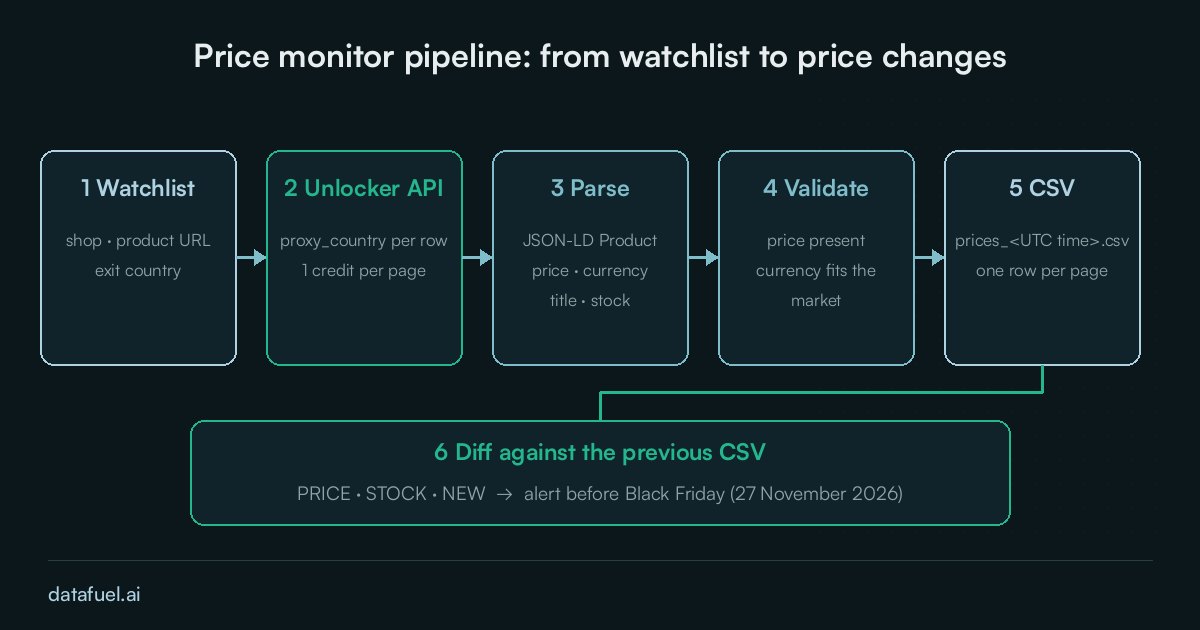
What price scraping collects
Competitor price tracking repeats data extraction on a schedule, turning each product page into one row with the product price, currency, title, availability, country and UTC timestamp. Retail teams use this price information to set optimal prices, protect profit margins and maximize profit, which makes monitoring pricing a daily routine; our Amazon price scraper guide covers one marketplace in depth, whereas this guide applies one parser to several shops.
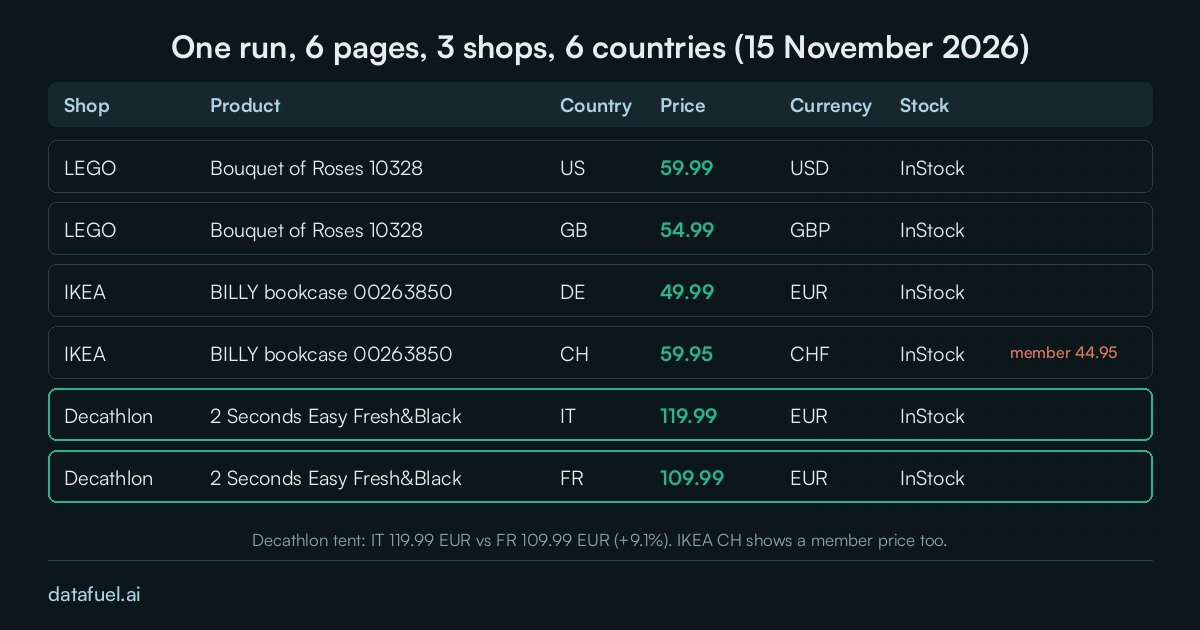
Why one product has different prices by country
A product page shows different amounts in different markets and currencies: the IKEA BILLY bookcase cost 49.99 EUR in Germany and 59.95 CHF in Switzerland, and the Decathlon 2 Seconds Easy Fresh&Black tent cost 119.99 EUR in Italy against 109.99 EUR in France, which makes the Italian listing 9.1% more expensive. Euro prices support a direct price comparison, whereas other currencies need a dated exchange rate, so the script stores the local price with its currency; our hotel price API test shows the same effect for hotel rates.
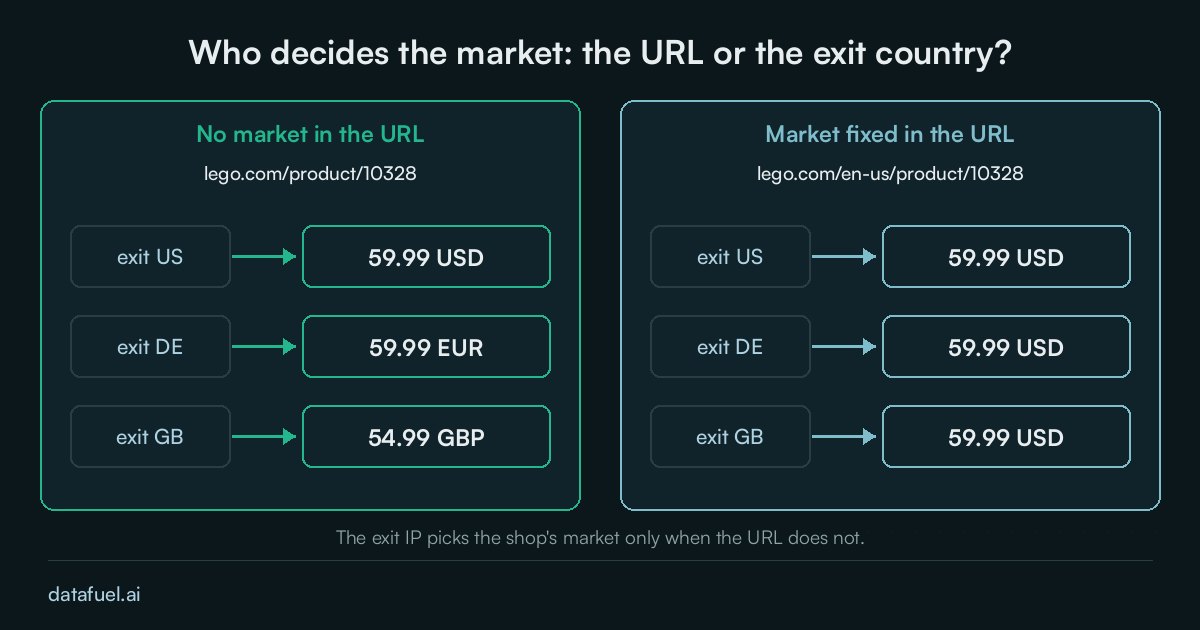
Who sets the market: the URL or the exit country
A shop selects the market from the URL, from the visitor's IP address, or from both. On LEGO, the URL lego.com/product/10328 returned 59.99 USD, 59.99 EUR and 54.99 GBP through the exit countries US, DE and GB, whereas lego.com/en-us/product/10328 returned 59.99 USD from all three. An IKEA Germany URL fetched from a British exit still returned 49.99 EUR, so the URL decides when it names a market and the exit IP decides when it does not; set proxy_country to the shop's own country and verify the currency on every row.
Where the price sits on a product page
Most shops embed a JSON-LD Product block, which is more stable for extracting data than a CSS selector, but our pages differ in two ways that break a naive parser:
- Type and location: LEGO stores the price as a number in
offers.price, IKEA stores it as a string, and Decathlon has nooffers.price, so its price sits inpriceSpecification. - Member prices: the IKEA Switzerland page lists 59.95 CHF next to a 44.95 CHF IKEA Family price valid from 9 to 15 November 2026, which the script stores in a separate column.
Fetch product pages with the Unlocker API
A plain requests.get() from our server on 15 November 2026 returned HTTP 403 on LEGO and Decathlon, with the default and with a browser User-Agent, while IKEA returned HTTP 200 with the product data. The script therefore sends every request through the Unlocker API, which takes a URL and a country in one POST request; a basic page costs 1 credit, JavaScript rendering costs 5, and failed requests are not billed. Our guide to bot detection in 2026 explains why plain requests fail, and residential proxies suit your own client.
Competitor price tracking Python code
The script needs requests and a DATAFUEL_API_KEY environment variable. It fetches each watchlist row through its exit country, extracts the Product data, marks a row ok only when the price has the currency of its market, writes prices_<UTC time>.csv and prints the differences from the previous file.
import csv, glob, json, os, re, sys, time
from datetime import datetime, timezone
import requests

API = "https://scraping-api.datafuel.ai/api/v1/task"
CURRENCY = {"US": "USD", "GB": "GBP", "CH": "CHF", "DE": "EUR", "FR": "EUR", "IT": "EUR"}
DECA = "/308355/c227c98c340m8553541"
WATCHLIST = [  # (shop, URL, exit country)
    ("lego", "https://www.lego.com/product/10328", "US"),
    ("lego", "https://www.lego.com/product/10328", "GB"),
    ("ikea", "https://www.ikea.com/de/de/p/billy-buecherregal-weiss-00263850/", "DE"),
    ("ikea", "https://www.ikea.com/ch/it/p/billy-libreria-bianco-00263850/", "CH"),
    ("decathlon", "https://www.decathlon.it/p/tenda-da-campeggio-2-seconds-easy-freshandblack-2-persone" + DECA, "IT"),
    ("decathlon", "https://www.decathlon.fr/p/tente-de-camping-instantanee-2-places-2-seconds-easy-fresh-and-black" + DECA, "FR"),
]

def fetch(url, country):
    body = {"type": "unlocker", "proxy_type": "Basic", "proxy_country": country,
            "attributes": {"url": url, "result_format": "html"}}
    for _ in range(2):  # failed requests are free, so one retry costs nothing
        task = requests.post(API, headers={"X-API-Key": os.environ["DATAFUEL_API_KEY"]}, json=body, timeout=150).json()
        if task.get("status_code") == 200:
            break
    return (task.get("result") or {}).get("data", ""), task.get("credits_used") or 0

def parse(html):
    for raw in re.findall(r'<script[^>]*ld\+json[^>]*>(.*?)</script>', html, re.S):
        try:
            data = json.loads(raw)
        except ValueError:
            continue
        for node in data if isinstance(data, list) else data.get("@graph", [data]):
            if node.get("@type") == "Product":
                offer = node["offers"][0] if isinstance(node["offers"], list) else node["offers"]
                specs = offer.get("priceSpecification") or []
                specs = specs if isinstance(specs, list) else [specs]
                regular = next((s for s in specs if "validForMemberTier" not in s), {})
                member = next((s for s in specs if "validForMemberTier" in s), {})
                price = offer.get("price") or regular.get("price")  # Decathlon has no offers.price
                return {"title": node.get("name"), "price": float(price) if price else None,
                        "currency": offer.get("priceCurrency") or regular.get("priceCurrency"),
                        "availability": offer.get("availability", "").rsplit("/", 1)[-1],
                        "member_price": member.get("price")}
    return {}

def run():
    stamp, rows, credits = datetime.now(timezone.utc), [], 0
    for shop, url, country in WATCHLIST:
        html, used = fetch(url, country)
        credits += used
        row = {"checked_at": f"{stamp:%Y-%m-%dT%H:%M:%SZ}", "shop": shop, "country": country, "title": None, "price": None,
               "currency": None, "availability": None, "member_price": None, **parse(html), "url": url}
        row["status"] = "ok" if row["price"] and row["currency"] == CURRENCY[country] else "check"  # wrong market or empty page
        rows.append(row)
        time.sleep(1)  # one request per second
    path = f"prices_{stamp:%Y%m%d_%H%M%S}.csv"
    with open(path, "w", newline="", encoding="utf-8") as f:
        writer = csv.DictWriter(f, fieldnames=list(rows[0]))
        writer.writeheader()
        writer.writerows(rows)
    print(f"{path}: {sum(r['status'] == 'ok' for r in rows)}/{len(rows)} ok, {credits} credits")
    return path

def diff(old_path, new_path):
    read = lambda p: {(r["shop"], r["country"]): r for r in map(dict, csv.DictReader(open(p, encoding="utf-8")))}
    old, changes = read(old_path), 0
    for key, row in read(new_path).items():
        prev, label = old.get(key), " / ".join(key)
        if row["status"] != "ok":
            print(f"CHECK  {label}: no valid price"); changes += 1
        elif prev and row["price"] != prev["price"]:
            pct = (float(row["price"]) / float(prev["price"]) - 1) * 100
            print(f"PRICE  {label}: {prev['price']} -> {row['price']} {row['currency']} ({pct:+.1f}%)"); changes += 1
        elif prev and row["availability"] != prev["availability"]:
            print(f"STOCK  {label}: {prev['availability']} -> {row['availability']}"); changes += 1
    print(changes, "change(s) vs", old_path)

if __name__ == "__main__":
    if sys.argv[1:2] == ["diff"]:
        diff(*sys.argv[2:4])
    else:
        previous = sorted(glob.glob("prices_*.csv"))
        latest = run()
        if previous:
            diff(previous[-1], latest)
Run python price_monitor.py for a new CSV and a diff against the last file, or python price_monitor.py diff old.csv new.csv for two chosen files.
Live test results (15 November 2026)
We ran the script three times on 15 November 2026 between 12:11 and 12:15 UTC, with proxy_type: Basic and no JavaScript rendering, and every run returned 6 of 6 valid rows for 6 credits (the prices are in the table image above). Runs two and three reported 0 change(s), as expected for stable prices, so we edited a copy of the CSV to show a real change by lowering the LEGO UK price by 10% and marking the Decathlon France tent as sold out, which produced this simulated output:
PRICE  lego / GB: 54.99 -> 49.49 GBP (-10.0%)
STOCK  decathlon / FR: InStock -> OutOfStock
2 change(s) vs prices_20261115_121531.csv
The two changes are simulated, whereas the six prices are real.
Set up price scraping before Black Friday
Schedule the script once a day, for example with the cron line 0 7 * * * cd ~/price-monitor && python price_monitor.py >> monitor.log. A baseline recorded before 27 November lets you compare any "was" price on a sale banner with last week's price, and a longer history reveals pricing trends. At 1 credit per basic page, 100 products in 5 countries checked daily cost 500 credits a day.
Notify your team about any price update of 5% or more and any check row, so your own catalog stays competitively priced against competitor products, and keep the load polite with one request per second on public product pages. Our Carrefour UAE scraper guide applies the same method to grocery prices, and How to Monitor Competitors with Python and AI covers page changes that are not prices.
Frequently asked questions
Is price scraping legal?
Reading public product pages is common practice, but the rules depend on the shop's terms of use, your country and your use of the data, so check robots.txt and the terms, collect no personal data and ask a lawyer before you use the data commercially. This guide does not cover pages behind a login.
How do I scrape product prices with Python?
For tracking competitor prices, request the product page, parse the JSON-LD Product block with the json module and read the offer's price and currency. When a shop publishes no such block, fall back to a CSS selector and validate every row. The script above uses this method to extract pricing data from three shops.
Test the script on your own product list
Every Datafuel account starts with 1,000 free credits valid for one year, with no credit card required, and failed API requests are never billed. Check the pricing page for volume rates, replace the watchlist with your own products and run the script today, so your baseline is ready before Black Friday.