Amazon Price Scraper: Scrape Amazon Prices with Python
An Amazon price scraper fetches public product pages by ASIN and extracts the current buy-box price, currency, seller name and stock status. Teams scrape Amazon prices for e-commerce price tracking, catalog research and assortment checks across regional marketplaces.
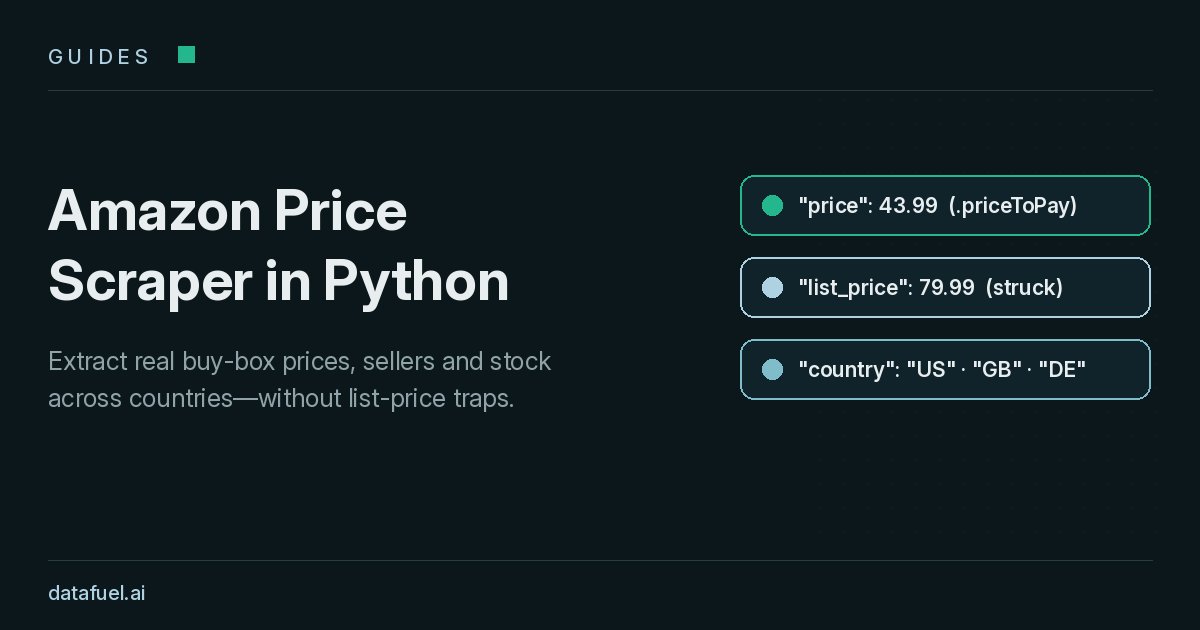
When you start scraping Amazon prices, you quickly see that one product does not have one global price. A listing on amazon.com, amazon.co.uk or amazon.de changes its price, shipping fee and availability based on the shopper's country and delivery ZIP code. The HTML also holds several price nodes at once, including struck-through list prices and third-party offers. If your parser picks the wrong CSS selector, your database fills with list prices instead of the price a buyer actually pays.
This guide shows how to build an Amazon product scraper in Python and compare two collection routes fairly. We also run a live test on five real ASINs across three countries and validate every batch against silent failures. It covers public product listings only and does not describe ways around login walls or access controls.
What an Amazon product scraper extracts to scrape Amazon product data
Every public product listing on Amazon uses a 10-character identifier called an ASIN (Amazon Standard Identification Number). For print books, the ASIN is the ISBN-10, which stays the same across US, UK and European marketplaces. For other categories, each item has its own catalog ASIN under /dp/<ASIN>.
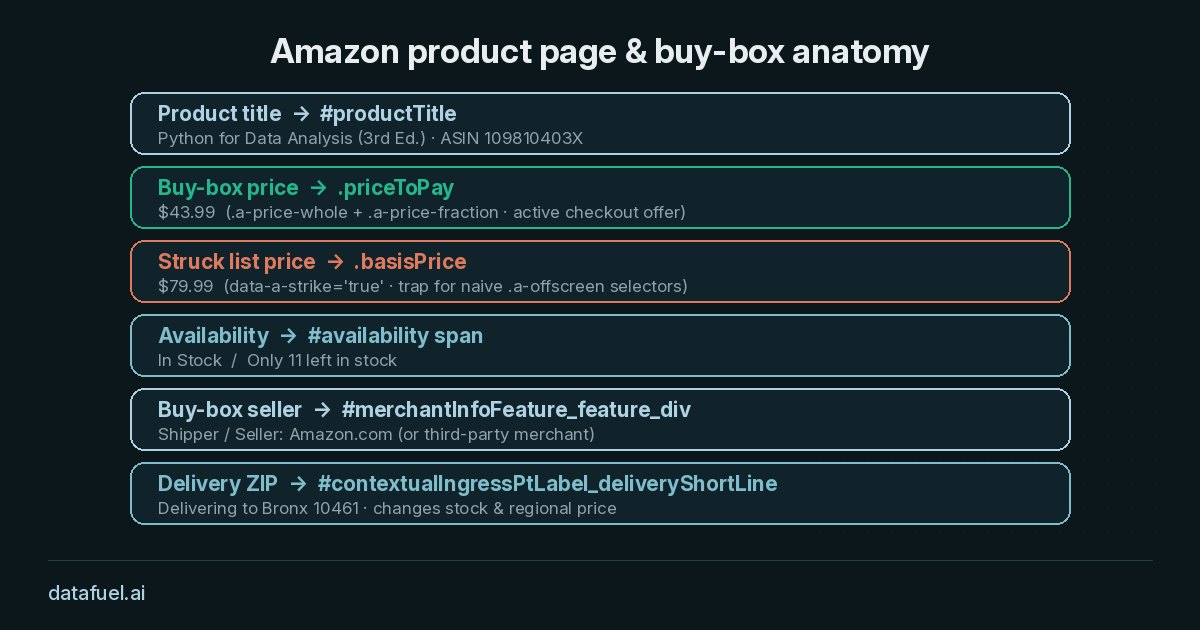
When teams scrape Amazon product data from a listing page, six fields matter most for price tracking:
- Product title (
#productTitle): the full item name at the top of the listing. - Buy-box price (
.priceToPay): the active offer price that wins the buy box. - Struck-through list price (
.basisPrice): the reference or "was" price shown next to a discount percentage. - Currency and marketplace: dollars on
.com, pounds on.co.uk, euros on.deand local currencies on other domains. - Availability (
#availability span): whether the product is in stock, low in stock or unavailable. - Seller and delivery location: the merchant winning the buy box and the delivery ZIP code Amazon assigned to the session.
Some teams also collect customer reviews, star ratings, the canonical product URL and product specifications from the same HTML response. Keep price fields separate from review fields so daily price checks stay small and fast, then export the scraped data to CSV files or a database table for downstream analysis.
Why scraping Amazon prices depends on country and ZIP code
As shown in our hotel price API by country test, e-commerce platforms tailor pages to the visitor's location. On Amazon, location affects product data in two ways:
- Marketplace domain and exit country. Requesting
amazon.defrom a German IP returns euro prices with local VAT included. Requestingamazon.comfrom a United States IP returns dollar prices before state sales tax. - Delivery ZIP code inside the page. Within one country, Amazon assigns a default delivery postcode based on the exit IP, such as
Bronx 10461in New York orEaling W3in London. Stock status, delivery dates and regional sellers shift from one postal area to another.
How to scrape Amazon by ZIP code or country consistently comes down to two habits. First, send each request from a residential IP in the target country or city. Second, parse and store the Delivering to ... label from the page alongside every price row. Recording that label proves which location Amazon used when it rendered the buy box.
Why a basic Python script fails on Amazon product pages
A beginner script usually sends HTTP requests with a default Python user agent and parses the first .a-offscreen span with BeautifulSoup. That approach fails for three reasons:
- Automated traffic checks. As covered in our guide to bot detection in 2026, large e-commerce sites score IP reputation, TLS fingerprints and request rate. Datacenter IPs trigger HTTP 503 responses or CAPTCHA pages within a few requests.
- Blank
.a-offscreenspans in the buy box. On current Amazon product pages, the.priceToPayblock often leaves<span class="a-offscreen"> </span>as blank whitespace. Instead, it splits the visible number across.a-price-symbol,.a-price-wholeand.a-price-fraction. Meanwhile, the struck-through.basisPriceblock still puts$79.99inside its.a-offscreentag. A naive.a-price .a-offscreenselector skips the blank buy-box span and grabs the higher list price instead. - HTTP 200 on error interstitials. A CAPTCHA challenge or a dog error page often arrives with status code 200. Without validation checks, your scraper records empty rows as out-of-stock products.
Two ways to build an Amazon price scraper
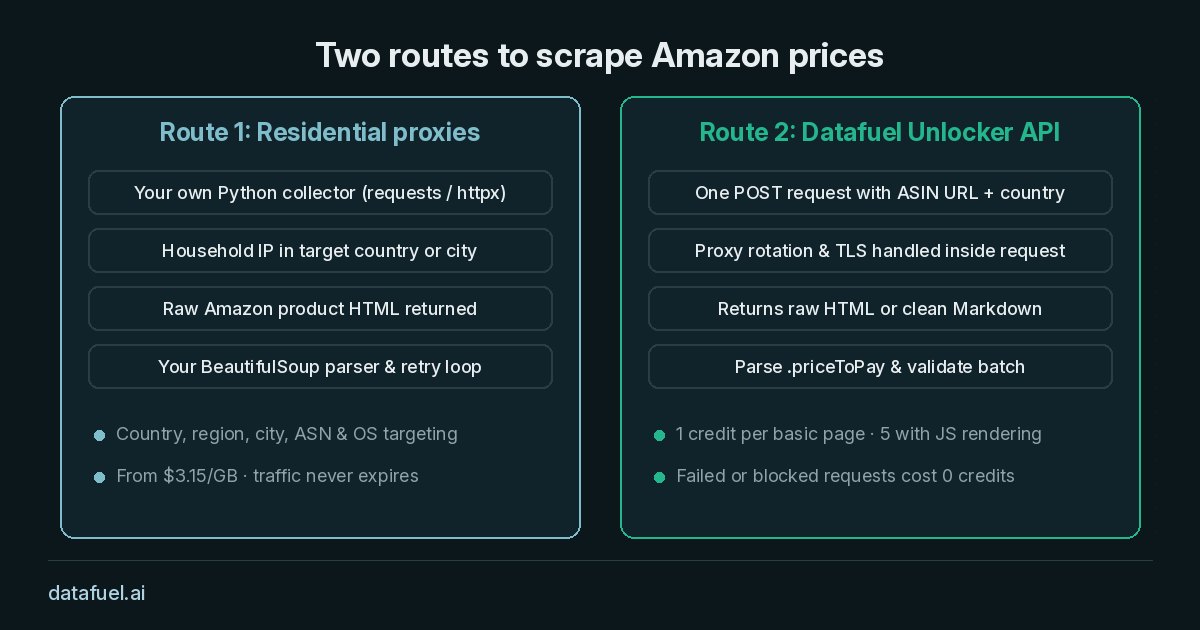
You can solve network rotation and page retrieval in two ways. The choice depends on whether you prefer to run your own HTTP client and parser or call an API that handles retries inside the request.
Route 1: Residential proxies with your own scraper
If you already run a Python collector with requests, httpx or Playwright, residential proxies route each request through household IPs in your target market. Datafuel residential proxies support country, region, city, ASN and operating system targeting. Sessions can rotate per request or stay sticky for up to 24 hours. Pricing starts from $3.15/GB, and traffic never expires.
In this setup, your script manages browser headers, rate limits, retries and HTML parsing:
import os, requests

user = "network-residential-country-us"  # country or city targeting in username
password = os.environ["DATAFUEL_PROXY_PASSWORD"]
proxy_url = f"http://{user}:{password}@gw-us.datafuel.ai:5555"

headers = {"User-Agent": "Mozilla/5.0", "Accept-Language": "en-US,en;q=0.9"}
resp = requests.get(
    "https://www.amazon.com/dp/109810403X",
    proxies={"http": proxy_url, "https": proxy_url},
    headers=headers,
    timeout=60,
)
print(resp.status_code, len(resp.text))
Route 2: Datafuel Unlocker API
If you prefer not to manage proxy pools, TLS fingerprints and CAPTCHA retries yourself, the Unlocker API accepts a target URL and country code and returns raw HTML or clean Markdown in one POST request. A basic request costs 1 credit, JavaScript rendering costs 5 credits when needed, and failed requests are not billed.
Teams that also discover product URLs through search engines can pair the Unlocker API with our workflow to scrape Google search results under the same API key.
How to scrape Amazon prices with an Amazon scraper Python script
The amazon scraper python script below fetches five public ASINs through the Unlocker API and parses the HTML with BeautifulSoup. Notice how parse_product reads .priceToPay by combining .a-price-whole and .a-price-fraction, while keeping the struck-through .basisPrice in a separate list_price field.
Set your API key in the DATAFUEL_API_KEY environment variable before running the code.
import json, os, re, time, requests
from bs4 import BeautifulSoup

API = "https://scraping-api.datafuel.ai/api/v1/task"
HEADERS = {"X-API-Key": os.environ["DATAFUEL_API_KEY"]}
ASINS = ["109810403X", "1098145356", "1449373321", "1492056359", "1098125975"]

def fetch_html(url, country="US", retries=3):
    body = {"type": "unlocker", "proxy_type": "Basic", "proxy_country": country,
            "attributes": {"url": url, "result_format": "html"}}
    for n in range(retries):
        task = requests.post(API, headers=HEADERS, json=body, timeout=180).json()
        code = task.get("status_code")
        if task.get("status") == "completed" and code == 200:
            return task["result"]["data"], task.get("credits_used", 0)
        if code in (404, 410):
            return None, 0
        time.sleep(2 ** n + 1)
    return None, 0

def parse_product(html, asin, country="US"):
    soup = BeautifulSoup(html, "html.parser")
    if soup.select_one("form[action*='validateCaptcha']"):
        raise ValueError(f"CAPTCHA served for {asin}")
    p2p = soup.select_one(".priceToPay")
    whole = p2p.select_one(".a-price-whole") if p2p else None
    frac = p2p.select_one(".a-price-fraction") if p2p else None
    sym = p2p.select_one(".a-price-symbol") if p2p else None
    price = float(f"{re.sub(r'[^\d]', '', whole.text)}.{re.sub(r'[^\d]', '', frac.text)}") if whole and frac else None
    basis = soup.select_one(".basisPrice .a-offscreen")
    avail = soup.select_one("#availability span")
    seller = soup.select_one("#merchantInfoFeature_feature_div .offer-display-feature-text-message")
    zip_el = soup.select_one("#contextualIngressPtLabel_deliveryShortLine")
    return {
        "asin": asin, "country": country,
        "title": soup.select_one("#productTitle").get_text(strip=True),
        "price": price, "currency": sym.get_text(strip=True) if sym else "$",
        "list_price": basis.get_text(strip=True) if basis else None,
        "availability": avail.get_text(strip=True) if avail else None,
        "seller": seller.get_text(strip=True) if seller else None,
        "delivery_zip": zip_el.get_text(" ", strip=True) if zip_el else None,
    }

for asin in ASINS:
    html, _ = fetch_html(f"https://www.amazon.com/dp/{asin}", country="US")
    if html:
        print(json.dumps(parse_product(html, asin)))
Live benchmark: 5 ASINs and 3 countries tested on 23 October 2026
We ran this script against the live API on 23 October 2026. First, we fetched five books on amazon.com with proxy_country="US". Every request returned HTTP 200 on the first try and cost 1 credit (5 credits total for the US batch).
| ASIN | Product Title | Buy-Box Price | List Price | Availability | Delivery Location | Time | Credits |
|---|---|---|---|---|---|---|---|
109810403X | Python for Data Analysis (3rd Ed.) | $43.99 | $79.99 | In Stock | Bronx 10461 | 6.46s | 1 |
1098145356 | Web Scraping with Python (3rd Ed.) | $44.94 | $65.99 | Only 11 left in stock | Warren 44484 | 7.98s | 1 |
1449373321 | Designing Data-Intensive Applications | $67.78 | — | Only 6 left in stock | Bronx 10451 | 6.33s | 1 |
1492056359 | Fluent Python (2nd Ed.) | $43.99 | $79.99 | In Stock | High Point 27265 | 5.63s | 1 |
1098125975 | Hands-On Machine Learning (3rd Ed.) | $49.50 | $89.99 | In Stock | Philadelphia 19121 | 6.21s | 1 |
Compare Buy-Box Price with List Price. On four of the five items, a parser that reads the first non-empty .a-offscreen span records $65.99 to $89.99 instead of the real $43.99 to $49.50 checkout price. That single selector mistake inflates tracked prices by 47% to 82%.
Next, we fetched ASIN 109810403X across three regional marketplaces (amazon.com, amazon.co.uk and amazon.de) using matching exit countries (US, GB and DE):
| Marketplace | Country | Buy-Box Price | List Price | Stock Status | Delivery Postcode | Time | Credits |
|---|---|---|---|---|---|---|---|
amazon.com | US | $43.99 | $79.99 | In Stock | Bronx 10461 | 6.46s | 1 |
amazon.co.uk | GB | £46.66 | £63.99 | In stock | Ealing W3 | 4.48s | 1 |
amazon.de | DE | €59.14 | €81.50 | Only 18 left in stock. | Bad Vilbel 61118 | 4.29s | 1 |
All seven live requests completed in 4.29 to 7.98 seconds and used 7 credits in total.
Silent-failure checks for an Amazon price tracker Python pipeline
A production amazon price tracker python job runs on a schedule without human review. When Amazon changes a CSS class or serves a soft block with HTTP 200, your script will not crash. Instead, it will quietly write None or struck-through list prices into your database.
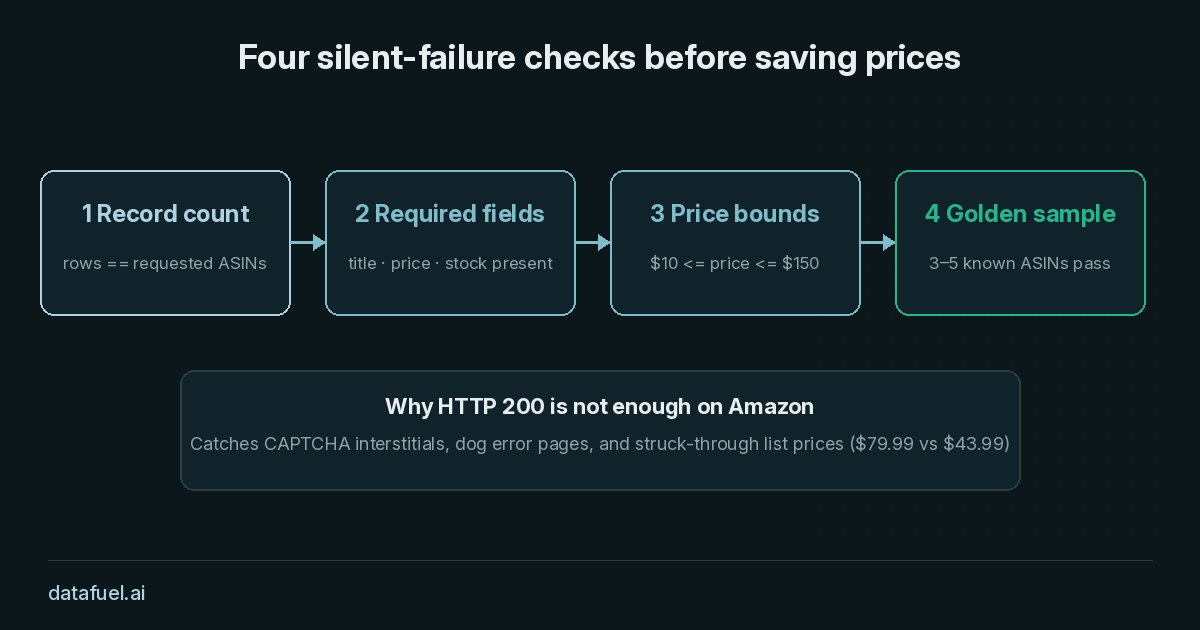
Run four validation checks before your pipeline commits a batch to storage:
- Record count check: confirm that the number of parsed items matches the number of requested ASINs.
- Required fields check: verify that
asin,title,price,currencyandavailabilityare non-empty on every row. - Sane min/max price bounds: reject prices outside expected bounds (such as under
$10or over$150for books), or rows wherepriceequalslist_priceacross a discounted catalog. - Golden sample check: include three to five known benchmark ASINs in every run. If those items fail extraction, quarantine the batch and alert your team before overwriting historical charts.
def validate_batch(rows, expected_count, min_price=10.0, max_price=150.0, golden=()):
    errors = []
    if len(rows) < expected_count:
        errors.append(f"Count mismatch: {len(rows)}/{expected_count}")
    for r in rows:
        for key in ("asin", "title", "price", "currency", "availability"):
            if not r.get(key):
                errors.append(f"Missing {key} on {r.get('asin')}")
        if r.get("price") and not (min_price <= r["price"] <= max_price):
            errors.append(f"Out-of-range price {r['price']} on {r['asin']}")
    seen = {r["asin"] for r in rows if r.get("price")}
    for asin in golden:
        if asin not in seen:
            errors.append(f"Golden ASIN {asin} failed")
    return errors
When we ran validate_batch on our five-book US batch with three golden ASINs, it returned [] (zero validation errors).
Frequently asked questions
Is scraping Amazon legal?
Whether it is legal to scrape public Amazon prices depends on your jurisdiction, the website's terms of service and how you use the data. Sticking to public product listings without logging in, collecting factual product data rather than personal data, and keeping request rates moderate is a common industry baseline. This guide is not legal advice, so review your specific use case with qualified legal counsel.
How often should an Amazon price scraper check each ASIN?
Polling frequency depends on your goal. For catalog analytics or weekly assortment reports, one check per day at a consistent hour is enough. For active buy-box monitoring on fast-moving electronics, teams typically check top ASINs every one to four hours and long-tail products once a day.
How do I handle CAPTCHAs and ZIP codes when scraping Amazon prices?
Use residential IPs matched to the target marketplace country so Amazon renders the right currency and local stock. If you manage your own scraper over residential proxies, rotate the exit IP whenever validateCaptcha appears in the HTML and pass a consistent session cookie for the ZIP code. If you use the Unlocker API, IP selection and retries happen inside the API call, and blocked requests cost zero credits.
When should I use the official Amazon Product Advertising API instead of a web scraper?
If you are an approved Amazon Associate driving affiliate referrals and only need data covered by the Product Advertising API (PA-API) within its rate limits, use the official API first. Teams build an Amazon price scraper when they do not run an affiliate site, need to verify exact page rendering across multiple countries and postal codes, or want a backup verification layer.
Test the script on your own ASIN list
Every Datafuel account starts with 1,000 free credits valid for one year, with no credit card required. Failed API requests are never billed. Check the pricing page for volume rates, set DATAFUEL_API_KEY in your terminal and run the five-ASIN test script above on the products you track.